Questions
1. What is the Acclivity–CSG Forte integration??
2. What are the supported regions and payment methods of an Acclivity-CSG Forte integration??
3. What products do Acclivity merchants utilize?
4. Where can I obtain information about AccountEdge?
5. How can merchants sign up to use CSG Forte with Acclivity?
5.1. How long does approval take?
5.2. What should be done if an application is recalled, declined or appears stalled?
5.3. What is the next step after applying?
6. Where can I locate the Merchant ID and other credentials?
7. Are the credentials used for AccountEdge configuration the same as those used for credit card and eCheck (ACH) processing?
8. Where can an Acclivity merchant request support or resolve their inquiries?
9. What key additional resources do I have to consult?
1. What is the Acclivity–CSG Forte integration? |
Acclivity operates as a CSG Forte gateway-only partner, integrating CSG Forte’s payment processing capabilities directly into its accounting software platform. This integration enables users to accept and manage ACH and Credit Card payments within their existing environment, eliminating the need for separate payment systems.
AccountEdge products connect to CSG Forte’s payment infrastructure, allowing merchants to process transactions seamlessly from within the platform. While Acclivity provides the front-end experience and financial management tools, CSG Forte manages transaction processing, settlement, security, and compliance.
2. What are the supported regions and payment methods of an Acclivity-CSG Forte integration? |
|
|
Acclivity-CSG Forte service is provided based on the applicant's country:
| Country | Available Services |
| US | ACH & Credit Card, ACH Only, and Credit Card Only. |
| Canada | ACH or Credit Cards. |
3. What products do Acclivity merchants utilize? |
|
|
Acclivity’s primary product is AccountEdge, which is available in multiple versions and designed for small businesses. It can be used on Mac or Windows, either on the desktop or in the cloud, and is integrated through a “gateway only” model with the payment systems of CSG Forte.
Product | Credit Cards | eChecks / ACH | Vendor Payments | Direct Deposit | Product Type / Notes |
AccountEdge Pro | Yes | Yes | Yes | Yes | Accounting software used in desktop. |
AccountEdge Network Edition (NE) | Yes | Yes | Yes | Yes | Multi-user version of AccountEdge Pro. |
AccountEdge Connect | Yes | No | Yes | No | It is a web-based tool that enables users to send invoices, allows customers to pay online through a link included in the email, and supports recording transactions in the cloud with synchronization to AccountEdge Pro on the desktop. |
Accountedge Mobile | Yes | No | No | No | It is considered a legacy solution with limited support, and the company is prioritizing AccountEdge Connect instead. |
AccounEdge Hosted | Yes | No | Yes | No | The fully cloud hosted version of AccountEdge Pro, designed for both single user and multi-user. |
AccountEdge Web Pay (SWP) | Yes | Yes | Yes | Yes | An integrated service within the different versions of AccountEdge that enables the inclusion of a payment form within the site. |
Acclivity ReRun | Yes | Yes | Yes | Yes | It is an online solution for recurring payments. |
4. Where can I obtain information about AccountEdge? |
|
|
The primary source of information for Acclivity merchants regarding this product is the Acclivity portal and the resources developed by Acclivity through its various channels. The main resources are listed below.
The primary source of information for Acclivity merchants regarding this product is the Acclivity portal and the resources developed by Acclivity through its various channels. The main resources are listed below.
* AccountEdge University
* Welcome to AccountEdge
* AccountEdge YouTube Channel
* AccountEdge Knowledge Base
5. How can merchants sign up to use CSG Forte with Acclivity? |
|
|
Merchants can apply by visiting the AccountEdge portal and selecting the appropriate application type that best aligns with business needs (ACH only, credit card only, or both). Once the application is approved, the CSG Forte account can be connected to the selected Acclivity product enabling payment processing.
5.1. How long does approval take? |
|
|
Most Acclivity–CSG Forte applications are approved the same day they are submitted, provided all required information and documentation. Some cases may take longer if required additional review or clarification.
5.2. What should be done if an application is recalled, declined or appears stalled? |
|
|
If an application is recalled, declined, or appears stalled, the merchant should be referred to Acclivity support as the first point of contact. Acclivity will review the status, clarify whether additional information or documentation is required, and, if needed, coordinate directly with CSG Forte or the underwriting team to resolve the issue or submit a new/corrected application.
5.3. What is the next step after applying? |
|
|
After submitting the request, the merchant must wait for Acclivity to confirm receipt and proceed with its evaluation. Once the review is completed, the Acclivity merchant will be notified of the decision and, if approved, will receive the necessary credentials or configuration instructions. If additional information is required, the merchant will be asked to provide further details before a final decision is made.
6. Where can I locate the Merchant ID and other credentials? |
|
|
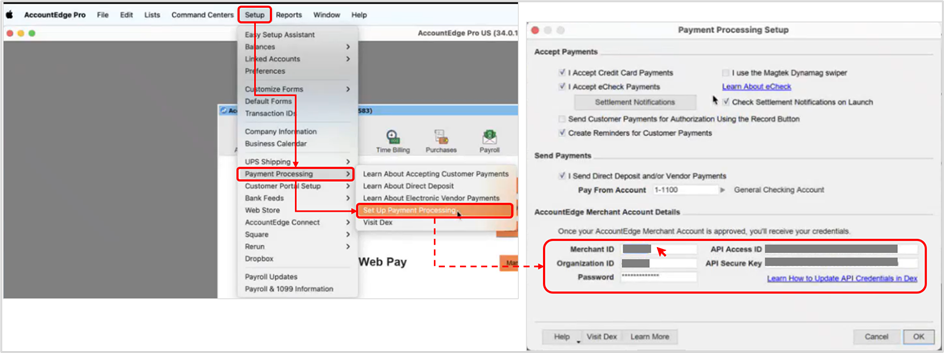
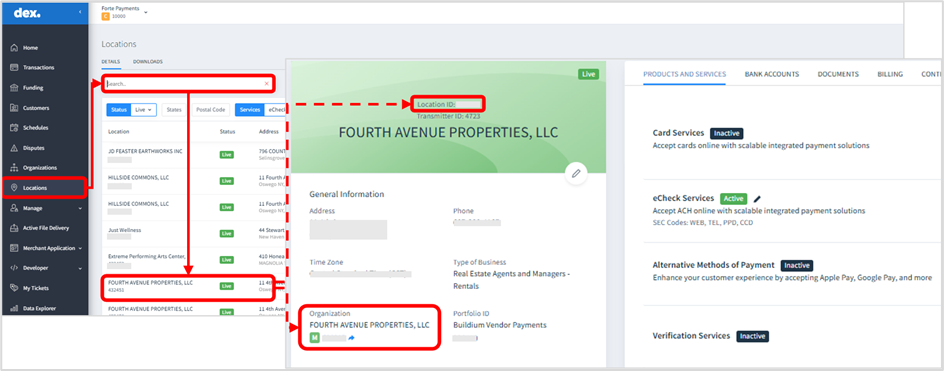
Acclivity merchants can locate the Merchant ID in the AccountEdge system and in Dex by following these steps:
AccountEdge
- Go to the “Setup” tab at the top of the menu.
- Select “Payment Processing” from the dropdown menu.
- Choose “Set Up Payment Processing”. In the window that appears, the Merchant ID and other information required for integration with CSG Forte systems will be displayed.
 Dex
Dex
- Access Dex and log in using the respective credentials.
- Select the “Locations” option from the left-hand panel.
- Use the search bar to look up the location by name.
- Select the corresponding account from the list by clicking on it.
- Locate the “Location ID” (Merchant ID) and the Organization ID, as shown in the image.
7. Are the credentials used for AccountEdge configuration the same as those used for credit card and eCheck (ACH) processing? |
|
|
The Merchant ID, Organization ID (username), and Password credentials are the same for both payment systems; however, credit card processing requires two additional credentials: the API Access ID and the API Secure Key.
8. Where can an Acclivity merchant request support or resolve their inquiries? |
|
|
If an Acclivity merchant has any questions about payment processing issues, they can contact customerservice@forte.net or call 866.290.5400, Option 1, Monday – Friday, 7 am – 7 pm CST.
9. What key additional resources do I have to consult? |
|
|
* CSG Forte / AccountEdge Video
* Merchant Account FAQ – AccountEdge / Payment Processing
* FAQs – Accepting eCheck / ACH Payments
* Direct Deposit FAQ and Pricing
* Electronic Vendor Payments FAQs
Was this article helpful?
That’s Great!
Thank you for your feedback
Sorry! We couldn't be helpful
Thank you for your feedback
Feedback sent
We appreciate your effort and will try to fix the article