Questions
1. What is the Zoho-CSG Forte integration?
2. What are the supported regions and payment methods of a Zoho-CSG Forte integration?
3. Are Zoho onboarding and application processes different from standard CSG Forte merchants?
4. How can merchants sign up to use CSG Forte with Zoho?
5. How long does approval take?
6. What should be done if an application was recalled, declined or appears stalled?
7. What is the next step after applying?
8. Where can training/demo be found on Zoho-CG Forte integration?
9. Can CSG Forte support other payment channels outside of Zoho?
10. Where pricing and fess details can be found?
1. What is the Zoho-CSG Forte integration? |
|
|
Zoho applications (such as Zoho Books and Zoho Payroll) integrate with CSG Forte to enable merchants to accept ACH and/or card payments directly within the Zoho platform, including invoicing and billing functionalities.
2. What are the supported regions and payment methods of a Zoho-CSG Forte integration? |
Zoho-CSG Forte service is provided based on the applicant's country:
Country | Available Services |
US | ACH & Credit Card, ACH Only, and Credit Card Only. |
Canada | ACH or Credit Cards. |
3. Are Zoho onboarding and application processes different from standard CSG Forte merchants? |
|
|
Yes. Zoho merchants must follow a Zoho-specific onboarding process. Prospective merchants are directed to apply via the dedicated Zoho application page rather than through standard CSG Forte application channels. Once approved, the CSG Forte account is then integrated within the Zoho platform.
Additionally, application follow-ups, such as status inquiries or underwriting delays, are managed as Zoho-specific opportunities by Sales and Underwriting teams, rather than as standard direct merchant applications.
4. How can merchants sign up to use CSG Forte with Zoho? |
|
|
Merchants can apply by visiting https://www.forte.net/zoho/ and selecting the appropriate application type that best aligns with business needs (ACH only, credit card only, or both). Once the application is approved, the CSG Forte account can be connected to the selected Zoho product (e.g., Zoho Books), enabling payment processing.
Note: Zoho Payroll prospective merchants must reach out directly to support@zohopayroll.com to submit their applications.
5. How long does approval take? |
|
|
Most Zoho–CSG Forte applications are approved the same day they are submitted, provided all required information and documentation. Some cases may take longer if required additional review or clarification.
6. What should be done if an application was recalled, declined or appears stalled? |
|
|
If your application was recalled or declined, or you do not see any progress, you should:
- Check your email (including spam/junk) looking for any CSG Forte requests.
- Reach out to your CSG Forte Sales contact (e.g., the representative who sent the Zoho application link) and they can coordinate internally to review the application status.
- If no Sales representative contacts are available, you should reach out to CSG Forte Customer Services, referencing your application number (if applicable) to facilitate the retrieval of application details.
7. What is the next step after applying? |
|
|
Once the CSG Forte account is created and approved, it can be synced within the Zoho Billing interface. The merchant should follow the next steps:
- Go to “Settings” and click “Online Payments” then select “Payment Gateways”
- Click “Set Up Now” and enter the information for the following fields in the displayed form: Location ID, API Login ID, Organization ID, Access ID, Secure Key, Bank Account, and Payment Method.
- After information is entered and validated, click “Save”
Note: For more information on how to set up a CSG Forte account with Zoho navigate to the “Integrate Zoho Billing with CSG Forte” resource.
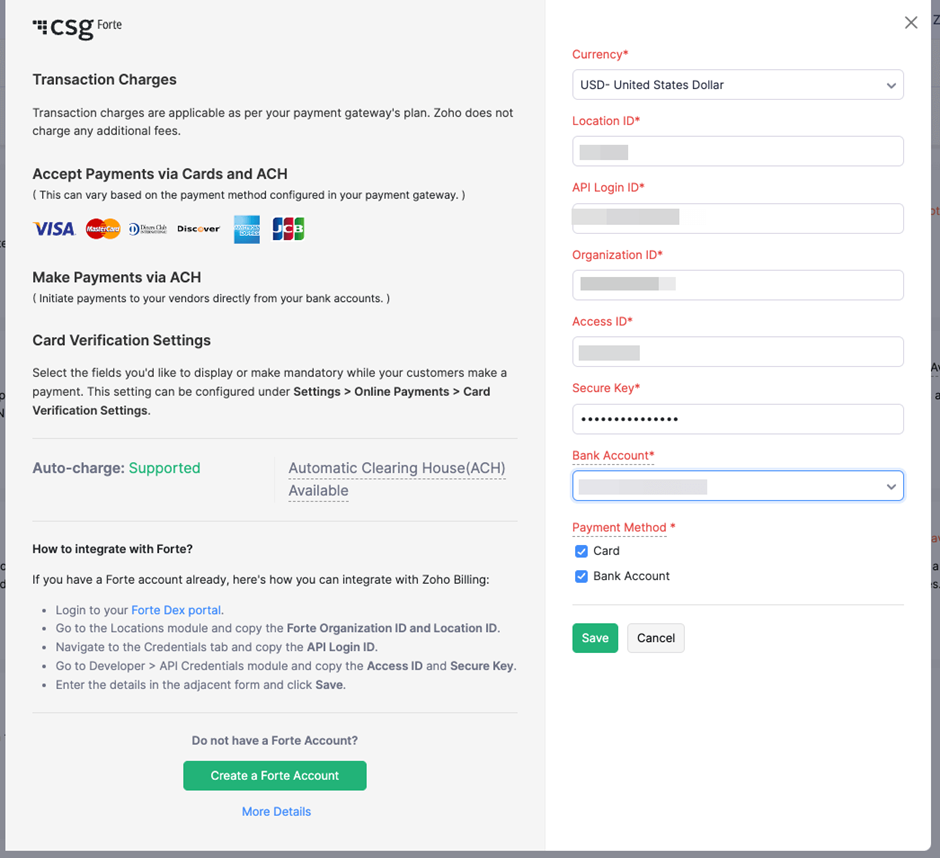 Payments initiated in Zoho (e.g., via invoices in Zoho Books) are processed by CSG Forte in the backend, and the resulting payment activity is synchronized back to Zoho for reconciliation and reporting. CSG Forte manages payment settlement, while Zoho remains the primary platform for invoicing and customer record management. Further details about the integration are available in the referenced resource.
8. Where can training/demo be found on Zoho-CG Forte integration? |
|
|
For Zoho product training (creating invoices, configuring payment gateways, etc.), merchants should refer to Zoho’s own resources (e.g., Zoho–Getting Started) or contact Zoho support at support@zohobooks.com. For questions specifically about CSG Forte processing or the merchant’s account, merchants should contact the assigned CSM or the Customer Services team by email at customerservice@forte.net, or by phone at +1 866-290-5400.
9. Can CSG Forte support other payment channels outside of Zoho? |
|
|
Yes, CSG Forte can support additional payment channels beyond Zoho, such as web forms, IVR, and in-person terminals. If additional non-Zoho payment flows are in place or planned, the CSG Forte Sales representative should be informed to enable further discovery and confirm compatible products and pricing.
10. Where pricing and fess details can be found? |
|
|
Pricing offered to Zoho merchants is shown at the bottom of each application page on the Forte Zoho site. For a detailed breakdown, merchants can use the Zoho Fees Explanation resource linked from the application page.
Was this article helpful?
That’s Great!
Thank you for your feedback
Sorry! We couldn't be helpful
Thank you for your feedback
Feedback sent
We appreciate your effort and will try to fix the article