Device Overview |
|
|
The eDynamo is a secure card reader that enables merchants to accept both magnetic stripe and EMV chip card transactions using a single, compact device. With dual connectivity USB HID (micro‑USB) and Bluetooth Low Energy (LE), the eDynamo supports both mobile and countertop deployment models.
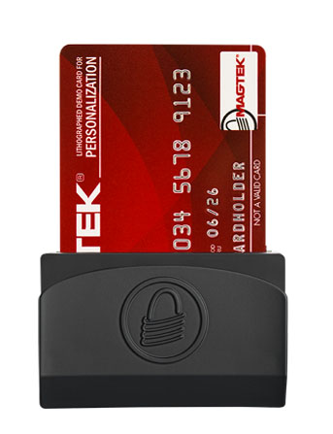
Key characteristics include:
- Flexible deployment: suitable for handheld, tablet based, and docked countertop payment environments.
- Multi platform support: Compatibility is provided across Windows, iOS, and Android host environments. The device operates with USB connectivity on Windows PCs running Windows 7, 8.1, or 10, and on supported Windows tablets (including Microsoft Surface Go or equivalent). Bluetooth Low Energy (BLE) connectivity is supported on iOS devices running iOS 7.1 or later and Android phones and tablets running Android 4.4.2 or later, in accordance with the applicable deployment and integration model.
- Integration ready: can be used with CSG Forte integrations (Forte Checkout, Dex, BillPay) as well as custom POS applications via AGI or REST APIs.
Supported Payment Methods |
The eDynamo supports the following card‑present payment technologies:
EMV Contact Chip Cards | • Supports EMV chip card transactions that meet ISO 7816 requirements and EMVCo Level 1 and Level 2 specifications. |
Magnetic Stripe Cards | • Reads triple‑track (TK1/2/3) magstripe data in both directions. • Compliant with ISO 7810 / 7811 and supports AAMVA driver license formats. |
Card Brands | • Quick Chip EMV and Swipe: Visa, Mastercard, American Express, Discover (including Visa 16‑ and 19‑digit PANs and Mastercard 5‑ and 2‑series BINs). • Swipe‑only: Diners Club and China UnionPay. |
Payment Operations |
|
|
During normal payment operations, the eDynamo supports multiple input modes through Forte platforms and custom integrations as mentioned in the overview.
Supported CSG Forte Integrations
- Forte Checkout
- BillPay
- Dex
In normal operation, eDynamo works as follows:
- Initialization
- Reader is powered (USB or BLE) and detected by the POS, Forte Checkout, or custom application.
- Card Read
- Cardholder swipes or dips card.
- EMV standard requires chip cards to be dipped first; swipe is permitted only after allowed EMV retry attempts fail and fallback rules are applied.
- Data Capture and Encryption
- eDynamo immediately encrypts card data (using 3DES with DUKPT) and transmits it over USB or BLE to the POS application.
- Transmission to CSG Forte
- POS formats the request and forwards it to CSG Forte, including encrypted card payload and any EMV tag data.
- Authorization and Response
- CSG Forte uses Magensa to decrypt the card data, forwards the request to the processor, and returns the authorization result to the POS.
- Receipt and Completion
- POS displays approval/decline outcome and prints or renders an EMV compliant receipt containing required EMV receipt elements.
Connectivity Options |
|
|
eDynamo supports two connectivity options: USB HID (micro-USB) for wired connections and Bluetooth Low Energy (BLE) for wireless connectivity.
This dual-interface design enables deployment across both countertop and mobile payment environments while supporting a range of operating systems and integration models.
In general, USB connectivity is used in Windows-based environments, whereas BLE connectivity supports iOS, Android, and BLE-enabled Windows devices, providing greater flexibility for portable and field-based payment scenarios. .
Hardware Features |
|
|
This section describes the primary external hardware elements of the eDynamo that merchants and cardholders interact with during day‑to‑day use, including the status LEDs that provide visual feedback and the pushbutton used to control the device’s operating modes.
- LEDs The eDynamo provides both a general status LED and a wireless status LED for operational visibility.
General Status LED
- Off – Battery depleted or idle, waiting for card input.
- Solid Green – Battery charged; device ready to read.
- Blinking Green – Authentication established or charging in progress.
- Amber – Wireless send failure.
- Red – Authentication failure, card read error, low battery, or tamper condition.
Wireless Status LED
- Off – Airplane, Discoverable, or Connected Mode (no active advertising).
- Three Blue Flashes – Entering Pairing Mode.
- Blinking Blue – Advertising; ready for host pairing.
- Solid Blue – Active BLE connection.
- Pushbutton and Device Modes
The side mounted pushbutton, located above the USB port, controls device modes. Supported modes include:
- Airplane Mode – shipping/storage state with wireless disabled.
- Reset Mode – holding the button for 5–10 seconds returns device to Airplane Mode.
- Discoverable Mode – brief press starts BLE advertising.
- Pairing Mode – 2 second press until wireless LED indicates pairing.
- Connected Mode – actively connected over USB or BLE.
- Tamper Mode – triggered after failed self test or tamper detection; device must be returned for factory servicing.
The eDynamo does not have a mechanical on/off switch; power state is controlled via connection and mode management.
Package and Device Inspection |
|
|
Upon receipt of eDynamo shipments:
- Verify that the device, USB cable, and optional dock (if ordered) match the packing list and show no visible damage.
- Confirm that documentation included (quick installation guide, regulatory notices) is present.
- Check that the physical form factor, labels, and markings match eDynamo specifications:
- No additional holes, labels, wiring, or modifications.
- Factory labels and serial numbers are intact and legible.
Any evidence of tampering (e.g., case separation, unusual labels, damaged ports) should be escalated through standard incident and RMA channels before the device is deployed. .
Installation and Setup |
|
|
This section outlines how to power, mount, and configure the eDynamo on supported platforms so that it is ready for secure production use:
Charging and Power
| • Fully charge on arrival (~3 hours or until solid green status LED). • A full charge supports 1,000+ card swipes in wireless mode; recharge at least every 6 months when stored. • When powered via USB, the device operates from USB power and bypasses the battery. |
Docking Station (Optional)
| The optional eDynamo Docking Station: • Provides a micro suction base for secure surface mounting. • Extends the swipe path for more reliable reads. • Offers recessed panels for merchant branding. Setup steps (summary):
|
Platform‑Specific Setup
| • Windows PCs/Tablets (USB/BLE)
• iOS / Android (BLE with Wedget)
|
Configuration and Integration |
|
|
This section provides step-by-step guidance for configuring the MagTek eDynamo reader and integrating it with CSG Forte applications or custom point-of-sale (POS) environments. Depending on the deployment model, implementation may require MagTek configuration utilities, Forte Checkout, AGI or REST integrations, and, for certain Bluetooth Low Energy (BLE) mobile deployments, the MagTek Wedget keyboard or companion application:
1. Determine the target deployment mode | Before configuration begins, the intended operating model should be identified, as the required tools and connection method differ by platform:
For Windows environments, eDynamo integrations may use USB or BLE together with the required MagTek connectivity component. For iOS and Android environments, BLE deployments may require the MagTek Wedget keyboard so encrypted reader output can be captured by the host application and securely forwarded for processing. |
2. 4. Prepare and connect the device | Prior to software configuration, the device should be physically prepared and validated for use:
Where a fixed countertop workflow is required, the optional docking station may be used to provide secure placement, a more stable swipe path, and simplified cable routing. |
3. Configure the reader with MagTek tools | After the device is connected, reader administration should be completed using the MagTek Reader Configuration Program or other approved MagTek utilities. These tools support the core configuration tasks required to place the device into service:
Configuration changes should be performed only through approved workflows because the eDynamo security model relies on encrypted card capture, controlled key management, and device-specific security controls. |
4. Configure the host application | Once the device has been prepared, the integration must be updated so that it can detect the reader, receive the encrypted card data, and pass the required values to CSG Forte for authorization processing. The implementation path differs by integration type. |
5. Forte Checkout integrations | For eDynamo deployments that use Forte Checkout, the host environment must be prepared according to platform:
|
6. Custom POS integrations using AGI or REST | For custom POS environments that do not use Forte Checkout, the application must capture the encrypted reader output and submit the appropriate request fields through AGI or REST.
For encrypted magstripe transactions, the application should submit the encrypted payload using the required reader identifiers:
For EMV transactions, the application must include the required EMV values in the EMV request field used by the integration. The source guidance specifically calls out EMV tags such as DFDF56 and DFDF59, which must be taken from the EMV transaction data structure and passed in card_emv_data or the equivalent EMV field supported by the implementation.
The application is responsible for enforcing fallback controls. In standard EMV processing, chip cards must first be processed as chip transactions, and magstripe fallback should be permitted only after the allowed EMV retry logic has been exhausted. The documented guidance indicates that the application should enforce business rules, typically three EMV attempts, before permitting fallback, and must also set the corresponding fallback indicator, such as pg_fallback_swipe or card.fallback_swipe. |
7. Mobile BLE deployments using Wedget | For BLE-based iOS and Android implementations that rely on Wedget, the following sequence should be followed:
This approach is generally used only for supported BLE mobile deployments and should be implemented consistently with the approved platform design for the application. |
8. Post-configuration validation | After reader setup and integration are complete, validation should be performed before production use:
|
Note: The reference to Setting Up an eDynamo should be treated as supporting implementation documentation, not as a physical item included in the package contents section. The documented package contents are limited to the device, USB cable, optional dock or accessories when ordered, and printed materials such as the quick installation guide and regulatory notices. | |
Security and Encryption |
|
|
This section describes the eDynamo security architecture, encryption model, and related compliance requirements that govern how card data is protected in card-present environments.
- Encryption and Data Protection
The eDynamo is designed to protect cardholder data at every stage of the transaction:
- Card data is encrypted at the point of entry and never exposed in clear text on the host.
- Encryption uses Triple DES (3DES) applied to each transaction.
- DUKPT key management ensures a unique, non reusable key for each transaction.
- Decryption is performed exclusively by Magensa Decryption Service, not on the POS device.
- MagneSafe® and Device Identity
MagneSafe® adds layered protection through:
- Strong encryption and secure tokenization of card data.
- Counterfeit card detection and tamper recognition.
- Data integrity checks and dynamic digital transaction signatures.
- Non changeable serial numbers for each device, enabling traceability and device attestation.
- Compliance and EMV Compliant Receipts
- eDynamo meets multiple compliance standards: FCC, CE, UL, RoHS.
- Merchants must produce EMV compliant receipts for all EMV sales and authorizations, using required data from Forte Checkout callbacks, and REST/AGI response messages.
Maintenance and Handling |
|
|
To maintain device performance and compliance:
- Cleaning
- Use approved cleaning cards for the magstripe and chip reader paths.
- Avoid spraying liquids directly onto the device; prevent liquids from entering openings.
- Battery Management
- For Bluetooth only deployments, fully charge before extended use and recharge as needed.
- When permanently docked at a countertop, keep the device connected to USB to minimize battery cycling.
- Physical Handling
- Use the docking station or compatible mounts to reduce strain on cables and provide stable user experience.
- Avoid drops, twisting, or excessive force on the housing and connectors .
EMV-Complaint Receipts |
|
|
This section defines the requirements and standards for generating EMV‑compliant receipts for transactions processed using CSG Forte-supported devices, including DynaFlex II Go and eDynamo. EMV‑compliant receipts are a mandatory component of payment processing and are required to ensure that all necessary EMV transaction data elements are properly captured and presented to the cardholder at the point of sale.
All device-specific guidance, technical specifications, and receipt formatting requirements for DynaFlex II Go and eDynamo integrations are maintained centrally within the CSG Forte Developer Portal and should be referenced for the most current and authoritative information.
- eDynamo: eDynamo – CSG Forte
- Dynaflex II Go: Dynaflex II GO – CSG Forte.
Ordering Payment Devices And Accessories |
|
|
This section outlines the standardized process for ordering supported payment devices and related accessories through the CSG Forte Equipment Portal. The ordering workflow is consistent across devices, with product selection varying by device category. This approach ensures accurate fulfillment, proper configuration, and alignment with merchant deployment requirements.
All supported devices are ordered through the CSG Forte Equipment Portal: Portal: http://equipment.forte.net
Navigation paths by device type:
•MagTek eDynamo: “Equipment” > “Mobile”
Available options include:
•MagTek eDynamo Card Reader (includes micro USB–to–USB cable)
•Optional accessories such as docking stations and compatible third party tablet stands
Indicative pricing is displayed in the portal and is subject to change; the portal should be treated as the authoritative source for current pricing and availability.
Standard Ordering Workflow
The ordering workflow is generally consistent across supported devices:
- Access the CSG Forte Equipment Portal.
- Navigate to the applicable device category.
- Select the required device model and any accessories.
- Add the selected items to the shopping cart.
- Review shipping options and estimated charges using the available shipping calculator, when provided.
- Complete checkout by entering the required billing, shipping, payment, and merchant information.
This approach is intended to support accurate ordering, appropriate device fulfillment, and correct configuration alignment.
Required Information To Place An Order
To complete an order, the following information must be provided:
Billing Information | • Contact first and last name • Merchant legal name • Billing address (street, city, state, postal code, country) • Phone number • Email address |
Shipping Information | • Ship‑to address (billing address or alternate location) • Selected shipping option, if applicable • Payment Information • Credit card payment, or • Invoice billing option (when permitted under the merchant’s agreement with CSG Forte) |
Merchant Details | • Merchant ID (required for invoicing and account tracking) • List of Merchant IDs to be configured on the device (when applicable) Order comments or special instructions (optional) |
Shipping, Fulfillment, And Special Instructions
- Shipping speed should be selected based on operational timelines and deployment needs.
- The order notes or special instructions field should be used to document delivery constraints (for example, receiving hours, building access requirements, or labeling instructions).
Post Order Considerations
- After delivery, device setup and configuration must be completed in accordance with this guide and applicable device specific procedures.
- Certain deployments may require additional steps such as device registration (for example, Wedget keyboard use for eDynamo), testing, or post provisioning validation.
Fees, Pricing, And Support
- Some configurations may incur additional fees, such as annual encryption or device management fees, as defined in current CSG Forte pricing and contractual terms.
- Questions related to pricing, availability, order status, or fulfillment should be directed to CSG Forte Sales or CSG Forte Support through the published support channels or support portal
Ordering Payment Devices And Accessories |
|
|
CSG Forte | Technical Support | EquipmentQuestions@forte.net |
Additional Links |
|
|
- MagTek eDynamo: Installation and Operation Manual
- eDynamo – CSG Forte
- eDynamo Video Overview
- eDynamo - PN 21079809
Was this article helpful?
That’s Great!
Thank you for your feedback
Sorry! We couldn't be helpful
Thank you for your feedback
Feedback sent
We appreciate your effort and will try to fix the article