Device Overview |
|
|
The DynaFlex II Go is a compact, secure card reader designed for mobile and countertop use. It supports modern payment acceptance by enabling merchants to process tap, dip (chip), and swipe transactions with strong built-in security.
Connectivity is provided via USB C or Bluetooth Low Energy (LE), allowing integration across multiple operating systems and platforms. The reader uses MagTek’s MagneSafe® security technology and is certified under PCI PIN Transaction Security (PCI PTS) standards, which are widely used benchmarks for protecting cardholder data during card-present transactions.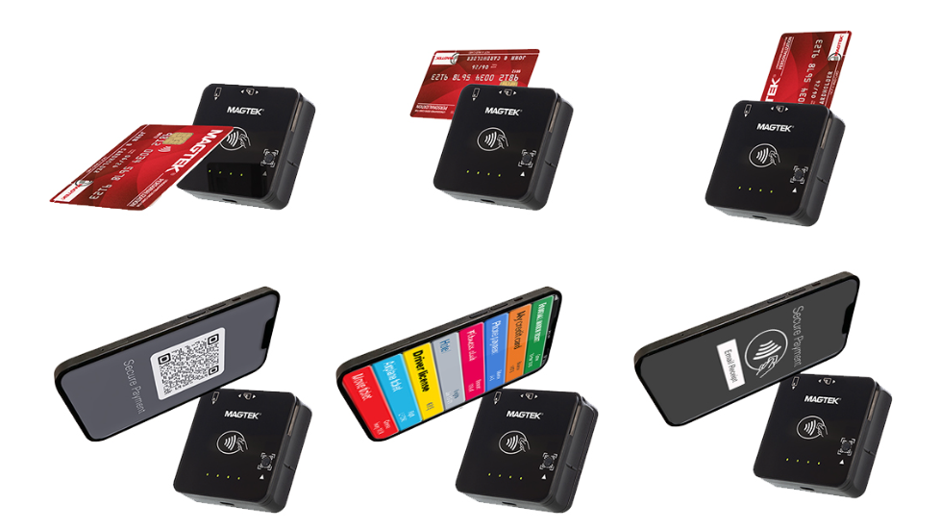
Supported Payment Methods |
The Dynaflex II go supports a wide range of payment methods to meet diverse merchant needs, including:
Magnetic Stripe (Magstripe) | • ISO 7810 and 7811 compliant, with AAMVA driver license support. • Bi-directional read capability, supporting swipe speeds from 6 to 60 inches per second (ips). |
EMV Contact Chip | • EMVCo Level 1 and Level 2 compliant. • ISO/IEC 7816 compliant contact interface. |
EMV Contactless / NFC | • ISO/IEC 18092 and ISO/IEC 14443 Type A/B compliant. • Supports major contactless schemes including D-PAS, PayPass, payWave, and ExpressPay. |
Mobile Wallets | Supports Apple Pay®, Google Pay™, and Samsung Pay® for contactless wallet transactions. |
Payment Operations |
|
|
During normal payment operations, the DynaFlex II Go supports multiple input modes through CSG Forte platforms and custom integrations.
Supported CSG Forte Integrations
- Forte Checkout
- BillPay
- Forte REST API–based applications
Typical payment flow:
- Application detects the reader and prompts the payer to tap, dip, swipe.
- Reader captures payment data and encrypts it according to MagneSafe security rules.
- Encrypted data is transmitted to CSG Forte via Forte Checkout, BillPay, or REST API.
- CSG Forte processes the request and returns an authorization or decline response.
- Application renders receipts or on screen confirmation, following EMV-compliant receipt guidelines where applicable.
Connectivity Options |
|
|
The DynaFlex II Go supports USB‑C for powered, stable countertop connectivity and Bluetooth® Low Energy (LE) for secure wireless mobile operation.
- USB C, When connected via USB C, the device is powered directly through the cable and supports high reliability wired communication. This option is recommended for fixed or semi fixed environments such as countertops and kiosks.
- Bluetooth LE, Bluetooth Low Energy (LE) enables wireless operation for mobile use cases. The reader includes an internal rechargeable lithium ion polymer battery, allowing merchants to process transactions without a physical cable while maintaining secure data transmission.
Hardware Features |
|
|
The DynaFlex II Go hardware design combines clear visual status indicators, intuitive controls, to support secure, efficient, and consistent card-present operations in both countertop and mobile environments.
- LEDs : The DynaFlex II Go includes four LEDs on the front face that provide visual feedback for device status and transaction state, for example indicating when the reader is ready, actively reading, has encountered an error, or is in a secure state. Detailed LED behavior, including specific patterns and color codes, is documented in the MagTek Installation and Operation Manual
- Buttons: A single tactile pushbutton is located on the right side of the DynaFlex II Go and is used for device control functions, including initiating specific configuration workflows and performing wake or reset operations. No additional physical controls or switches should be present on the sides of the device; the presence of extra buttons, switches, or openings may indicate tampering and should be investigated before the device is used.
Package and Device Inspection |
|
|
Proper package and device inspection are required to maintain PCI compliance and detect potential tampering.
Package Inspection | Packaging Form Factor | •Device is shipped in a white corrugated cardboard box with black ink printing. •Internally, the device is secured in Korrvu cling wrap inside a cardboard insert with thumb hole cutouts for removal. •Standard contents include: • DynaFlex II Go device oUSB cable(s) • Device Inspection Document • Quick Installation Guide |
Tamper‑Evident Security Tape | • Security tape runs from the front flap to the bottom of the package. • Tape must be intact and show no signs of lifting, cuts, or replacement. • If removed or disturbed, the tape displays “VOID” and “OPENED” text and leaves inverted ink impressions on the cardboard. | |
Exterior Printing and Labels | • Front of package: product name, PCI certification information, MagneSafe® security details, and icons for supported capabilities plus QR codes for more information. • Back of package: industry compliance logos and manufacturer address (MagTek, Inc., Seal Beach, CA). • Left side: printed package contents and a product label including serial number, part number, and lot details. • Right side: storage requirements and caution notes. | |
If any tears, breaks, additional adhesive, or signs of tape replacement are present, do not deploy the device. Set it aside and contact CSG Forte Support for guidance on next steps, including return or replacement options. | ||
Physical Device Inspection | Overall Factor | • Smooth outer shell with molded seams only between top and bottom halves. • No breaks in plastic, extra wires, or noticeable change in size or weight compared to specification. |
Top of Device | • EMV chip slot with smooth insertion path and visible chip contact points only. • Magstripe reader slot with a single spring‑mounted read head and smooth swipe path. • Contactless landing zone: flat, non‑moving surface marked with the contactless symbol. | |
Front Face | • Clear directional icons for tap, dip, and swipe locations. • Four LED indicators aligned per product design. • On BCR models, a distinct barcode window with QR code icon and directional arrow. | |
Bottom | Single USB‑C receptacle, with no additional cables permanently attached or extraneous holes or modifications. | |
Right Side | Single tactile pushbutton only; no additional openings or controls. | |
Back | Product label with serial number, part number, hardware ID, manufacturing date, and certification markings. | |
If forced entry is suspected, the device may automatically clear security keys and stop working. Remove the device from service and contact CSG Forte Support to arrange return (RMA) or replacement. Do not attempt to repair the device in the field. | ||
PCI Device Validation | For each DynaFlex II Go device, perform PCI validation as part of setup and recurring audits:
| |
Installation and Setup |
|
|
Installation and setup activities should follow both CSG Forte and MagTek guidance. At a high level:
- Pre installation Verification
- Confirm the device and packaging have passed the inspection and PCI validation steps outlined above.
- Ensure that intended host systems meet OS and connectivity requirements (Windows, iOS, Android, Linux; USB C or Bluetooth LE support).
- Power and Physical Connection
- For USB C deployments, connect the device to the host using the supplied USB cable; the host will provide power.
- For Bluetooth LE deployments, ensure the internal battery is sufficiently charged, then perform the pairing process as documented in the DynaFlex II Go Installation and Operation Manual.
- Software Components
- Install and use the MagTek Reader Configuration Program, which is required for reader configuration firmware management.
- For CSG Forte integration (Forte Checkout, BillPay and Applications integrated using the CSG Forte REST API), follow the Integration Page for DynaFlex II Go on the CSG Forte Developer Portal for specific setup flows.
- MagTek Wedget (Keyboard Wedge) Configuration(Required for browser based POS integrations)
- Install the MagTek Wedget application and corresponding keyboard extension on the host mobile device (Android or iOS).
- Enable the Wedget keyboard within the device system settings and set it as the default input method when prompted.
- Pair the DynaFlex II Go device with the Wedget application via Bluetooth LE, ensuring the reader is placed in pairing mode and successfully connected.
- Configure the Wedget application to use the connected reader as the default device.
- Validate that the Wedget keyboard captures encrypted card data and inputs it into the active browser based POS field for processing through CSG Forte
- Host Application Configuration
- Configure the POS, Forte Checkout, BillPay, or REST API integration to recognize the reader, using the appropriate interface (USB or Bluetooth LE) and device identification parameters.
- Initial Test Transactions
- Execute test transactions (tap, dip, swipe and contactless (Apple Pay/ Google Pay / Samsung Pay)) to validate connectivity, correct data capture, and successful processing through CSG Forte.
For detailed step by step procedures, always refer back to the DynaFlex II Go Installation and Operation Manual and the CSG Forte Developer Portal integration page for DynaFlex II Go. .
Security and Compliance |
|
|
The DynaFlex II Go is engineered for high‑assurance payment environments and incorporates multiple layers of security. Key elements:
PCI PTS POI v6.x Certification | Certified under PCI PIN Transaction Security standards as a secure card reader/authenticator |
MagneSafe® Security Architecture | • Encryption: AES 128/256 DUKPT with CMAC authentication and TDEA/DUKPT. • Tokenization and authentication mechanisms to protect account data. • Dynamic data to mitigate replay and cloning attacks. |
Tamper‑Responsive Design | • Internal security switches clear sensitive data (keys, certificates) upon tamper detection. • Tampered devices are rendered inoperable and must be removed from service. |
Compliance Certifications | • FCC (Part 15, Class B), Canadian ICES‑003, Industry Canada RSS. • UL / CUR safety recognition. • CE and EU Directive 2014/53/EU compliance. • UKCA compliance. • RoHS lead‑free, environmentally compliant configuration. |
Cryptographic and Data-Protection Practices | Use of modern algorithms (e.g., AES, RSA, ECDSA, SHA‑256) and key management policies as described in the DynaFlex II Go Security Policy |
Maintenance and Best Practices |
|
|
To preserve device reliability, security, and compliance, the following maintenance and best practice guidelines should be observed:
- Environmental Conditions
- Operate the device within specified ranges (e.g., 32°F–95°F / 0°C–35°C, 10%–90% non condensing humidity).
- Store in equivalent or recommended conditions per MagTek guidelines.
- Periodic Inspections
- Perform physical inspections routinely using the checklist provided in the inspection guide.
- Verify that form factor, labels, and security tape (where applicable) show no signs of tampering.
- Security and Key Management
- Adhere to MagTek and PCI recommendations for key management, certificate handling, and revocation.
- Use authorized tools (e.g., Reader Configuration Program, Magensa services) for key injection and updates.
- Recordkeeping
- Maintain accurate records of device deployment, serial numbers, configuration versions, and inspection logs.
- Cleaning and Handling
- Follow MagTek’s cleaning instructions (e.g., using appropriate cleaning cards, avoiding excessive liquids) as documented in the Installation and Operation Manual.
Troubleshooting |
|
|
Troubleshooting for the DynaFlex II Go must be performed using standard operational verification steps in conjunction with approved configuration, diagnostic, and logging tools. The steps below are intended to isolate common device, connectivity, and compliance‑related issues.
Common troubleshooting steps:
- No Power or Connectivity
- Confirm USB C cable is properly connected and host USB port is powered.
- For Bluetooth LE operation, verify the battery is charged and the host has Bluetooth enabled.
- If wireless connection cannot be established after verification and re‑pairing attempts, the device must be removed from service. Wireless connection failures are not resolved through field repair.
- Transactions Not Detected or Failing
- Confirm the integrations (Forte Checkout, BillPay, or can approved custom POS application) is correctly configured for the chosen interface and device.
- Review logs generated by the MagTek Reader Configuration Program on the support portal of MagTek to verify whether the device is successfully reading card data.
- For EMV or contactless issues, verify EMV Tags and CAPKs loaded on the device are current and aligned with approved configuration sets
- Physical Damage or Tamper Alerts
- If there are visible signs of damage, missing components, or tamper triggers (device non functional after suspected intrusion), remove the device from service.
- Filed repair is not permitted. The device must be processed through formal Return Material Authorization (RMA) procedures in accordance with vendor and CSG Forte requirements.
- PCI Validation Errors
- Recheck Hardware ID and Firmware ID values and validate against the PCI Approved Devices list.
- If discrepancies are found, escalate to CSG Forte Support or device vendor support.
For complex cases, consult the MagTek Installation and Operation Manual, the DynaFlex II Go Security Policy, contact CSG Forte Support via the support portal or phone as referenced in the ordering and equipment documentation, or consult any documentation on CSG Forte’s developer portal: Dynaflex II GO – CSG Forte.
EMV-Complaint Receipts |
|
|
This section defines the requirements and standards for generating EMV‑compliant receipts for transactions processed using CSG Forte-supported devices, including DynaFlex II Go and eDynamo. EMV‑compliant receipts are a mandatory component of payment processing and are required to ensure that all necessary EMV transaction data elements are properly captured and presented to the cardholder at the point of sale.
All device-specific guidance, technical specifications, and receipt formatting requirements for DynaFlex II Go and eDynamo integrations are maintained centrally within the CSG Forte Developer Portal and should be referenced for the most current and authoritative information.
- eDynamo: eDynamo – CSG Forte
- Dynaflex II Go: Dynaflex II GO – CSG Forte
Ordering Payment Devices And Accessories |
|
|
This section outlines the standardized process for ordering supported payment devices and related accessories through the CSG Forte Equipment Portal. The ordering workflow is consistent across devices, with product selection varying by device category. This approach ensures accurate fulfillment, proper configuration, and alignment with merchant deployment requirements.
All supported devices are ordered through the CSG Forte Equipment Portal: Portal: http://equipment.forte.net
Navigation paths by device type:
•DynaFlex II Go: “Card Readers” > “Mobile & Contactless”
Available products and bundles include:
•DynaFlex II Go Card Reader – Standard reader for mobile and countertop use
•DynaFlex II Go + Stand Bundle – Countertop deployment with customer facing stand
•Desktop Docking Cradle – Optional accessory for charging and fixed placement
•OtterBox uniVERSE Adaptor – Optional clip for compatible mobile device cases
•DynaFlex II Go + OtterBox Adaptor Clip Bundle – Mobile deployment bundle
Standard Ordering Workflow
The ordering workflow is generally consistent across supported devices:
- Access the CSG Forte Equipment Portal.
- Navigate to the applicable device category.
- Select the required device model and any accessories.
- Add the selected items to the shopping cart.
- Review shipping options and estimated charges using the available shipping calculator, when provided.
- Complete checkout by entering the required billing, shipping, payment, and merchant information.
This approach is intended to support accurate ordering, appropriate device fulfillment, and correct configuration alignment.
Required Information To Place An Order
To complete an order, the following information must be provided:
Billing Information | • Contact first and last name • Merchant legal name • Billing address (street, city, state, postal code, country) • Phone number • Email address |
Shipping Information | • Ship‑to address (billing address or alternate location) • Selected shipping option, if applicable • Payment Information • Credit card payment, or • Invoice billing option (when permitted under the merchant’s agreement with CSG Forte) |
Merchant Details | • Merchant ID (required for invoicing and account tracking) • List of Merchant IDs to be configured on the device (when applicable) • Order comments or special instructions (optional) |
Shipping, Fulfillment, And Special Instructions
- Shipping speed should be selected based on operational timelines and deployment needs.
- The order notes or special instructions field should be used to document delivery constraints (for example, receiving hours, building access requirements, or labeling instructions).
Post Order Considerations
- After delivery, device setup and configuration must be completed in accordance with this guide and applicable device specific procedures.
- Certain deployments may require additional steps such as device registration (for example, Wedget keyboard use for eDynamo), testing, or post provisioning validation.
Fees, Pricing, And Support
- Some configurations may incur additional fees, such as annual encryption or device management fees, as defined in current CSG Forte pricing and contractual terms.
- Questions related to pricing, availability, order status, or fulfillment should be directed to CSG Forte Sales or CSG Forte Support through the published support channels or support portal
Ordering Payment Devices And Accessories |
|
|
CSG Forte | Technical Support | EquipmentQuestions@forte.net |
Additional Links |
|
|
- Dynaflex II GO – CSG Forte
- DynaFlex II Go: Installation and Operation Manual
Was this article helpful?
That’s Great!
Thank you for your feedback
Sorry! We couldn't be helpful
Thank you for your feedback
Feedback sent
We appreciate your effort and will try to fix the article