Questions
1. Digital wallets fundamentals
1.1. What are digital wallets?
1.2. What are the supported digital wallets?
1.3. What is the processing and integration compatibility?
1.4. What are the transaction conditions?
1.5. What is the convenience fee compatibility?
1.6. What are the merchant eligibility requirements?
1.7. Wallet-specific requirements
2. Digital wallet enablement
2.1. How is the enablement process?
2.2. How is the domain verification completed for Apple Pay?
2.3. What are the final steps for the enablement completion?
3. How are wallet transactions identified in Dex?
1. Digital Wallets Fundamentals |
|
|
1.1. What are digital wallets? |
|
|
“Digital Wallets” are electronic payment applications that securely store payment information, allowing customers to complete transactions without manually entering their payment details each time. CSG Forte supports digital wallet options including Apple Pay, Google Pay, PayPal, and Venmo, subject to applicable availability and requirements. Digital wallets use tokenization and secure authentication methods to provide a faster, more convenient, and secure payment experience.
Key benefits:
- Faster Checkout: Reduces manual payment entry and checkout steps.
- Security and Privacy: Uses tokenized payment information instead of exposing card details.
- Secure Authentication: Supports security methods such as passwords, PINs, fingerprints, and facial recognition.
- Convenience: Allows customers to use stored payment methods from supported devices.
- Improved Checkout Experience: Fewer steps can simplify the payment experience and help reduce checkout abandonment.
Digital wallets can help reduce PCI scope by limiting the exposure of payment card information; however, merchants must continue to maintain PCI compliance for other applicable transaction methods. For more information visit the developers documentation.
1.2. What are the supported digital wallets? |
|
|
CSG Forte supports Apple Pay, Google Pay, PayPal, and Venmo. Availability and functionality vary depending on the processor, processing model, integration method, merchant configuration, and wallet-specific requirements. Apple Pay and Google Pay are supported across several processing configurations, while PayPal and Venmo follow different availability and enablement models.
| Digital Wallet | General Availability |
| Apple Pay | Available for supported card-processing configurations through FCO, REST API, and BillPay. |
| Google Pay | Available for supported card-processing configurations through FCO, REST API, and BillPay. |
| PayPal | Available through supported processing configurations and through FCO or REST API. |
| Venmo | Offered in connection with PayPal enablement. Venmo is available only in the United States. |
Merchants can enable one or multiple supported digital wallets based on their applicable processing configuration and requirements. If a customer’s device is not compatible with an enabled digital wallet, the wallet option is not displayed, and the customer can continue using the available standard payment options.
1.3. What is the processing and integration compatibility? |
|
|
Digital wallet availability varies based on the merchant’s processing configuration and integration method. Apple Pay and Google Pay are supported with WorldPay, Vantiv, acquired WorldPay, and Fiserv Gateway configurations. PayPal is supported with Fiserv Gateway, Enhanced Gateway (Chase), and acquired WorldPay.
Apple Pay, Google Pay, and PayPal support FCO and REST API integrations. BillPay supports Apple Pay and Google Pay but does not support PayPal .
| Category | Processor or Integration | Apple Pay | Google Pay | PayPal |
| Processor | WorldPay | Supported | Supported | N/A |
| Processor | Vantiv | Supported | Supported | N/A |
| Processing Model | Fiserv Gateway | Supported | Supported | Supported |
| Processing Model | Enhances Gateway (Chase) | Not Supported | Not Supported | Supported |
| Processing Model | Acquired WorldPay | Supported | Supported | Supported |
| Integration Method | FCO | Supported | Supported | Supported |
| Integration Method | REST API | Supported | Supported | Supported |
| Integration Method | BillPay | Supported | Supported | Not Supported |
1.4. What are the transaction conditions? |
|
|
Digital wallet transactions are subject to wallet-specific processing conditions. For Apple Pay and Google Pay, the merchant must have card services enabled. Transactions are processed as Sale using a fixed, non-editable transaction type, and the funding flow follows the same process used for credit card transactions.
Apple Pay and Google Pay also support transactions when a compatible device reader is connected to the V400C/Dynaflex II Go. PayPal is not supported through this device-reader flow.
| Transaction Condition | Apple Pay | Google Pay | PayPal |
| Card service enabled | Required | Required | N/A |
| Transaction type | Sale | Sale | N/A |
| Transaction type editable | No | No | N/A |
| Funding flow | Same as credit cards | Same as credit cards | N/A |
| V400C/Dynaflex II Go support | Supported | Supported | Not Supported |
| Refunds | Returned to the stored payment method | Returned to the stored payment method | Returned to the stored payment method |
1.5. What is the convenience fee compatibility? |
|
|
Convenience fee (CFee) support varies by digital wallet and fee model. Apple Pay, Google Pay, and PayPal support the Absorbed model. Compatibility differs when convenience fees are passed to the customer through Split Fund or Split Charge configurations.
Apple Pay supports Split Fund but does not support Split Charge. Google Pay supports Split Charge and conditionally supports Split Fund. PayPal does not support Split Fund or Split Charge convenience fee models.
| Convenience Fee Model | Apple Pay | Google Pay | PayPal |
| Absorbed | Supported | Supported | Supported |
| Split Fund | Supported | Conditional* | Not Supported |
| Split Charge | Not Supported | Supported | Not Supported |
Note: For Google Pay, Split Fund convenience fees are supported only when debit and credit cards have the same fee.
1.6. What are the merchant eligibility requirements? |
|
|
Before enabling Apple Pay or Google Pay, each merchant location must meet the applicable eligibility requirements. Eligibility depends on the merchant’s existing configuration, including card services, processor, market type, convenience fee model, integration method, and environment.
Apple Pay and Google Pay require card services to be enabled with at least one supported card brand: Visa, Mastercard, American Express, or Discover. Additional requirements may apply depending on the merchant’s processor, integration method, convenience fee configuration, and requested digital wallet.
| Eligibility Requirement | Requirement |
| Merchant Location | The request must be for an existing merchant location. |
| Card services | Card services must be enabled. |
| Card Brands | At least one supported card brand must be enabled: Visa, Mastercard, American Express, or Discover. |
| Processor | Validate the merchant’s processor. |
| Market Type | Validate that the applicable merchant configuration uses E-Commerce. |
| Convenience Fee Model | Validate the merchant’s fee model and apply the wallet-specific compatibility requirements. |
| Integration Method | Identify whether the merchant uses Forte Checkout (FCO) or REST API. |
| Environment | Identify whether the request applies to Production (Live) or Sandbox. |
1.7. Wallet-specific requirements |
|
|
In addition to the general merchant eligibility requirements, Apple Pay and Google Pay have wallet-specific requirements that must be met. These requirements vary based on the wallet, integration method, convenience fee configuration, and, when applicable, the merchant’s nonprofit status.
- Apple Pay requirements differ depending on whether the merchant uses FCO or REST API. For FCO implementations, domain registration is required as part of the enablement process. REST API implementations follow a different setup in which the merchant generates and applies the required cryptographic parameters .
| Requirement | Apple Pay Condition |
| Convenience Fee Model | Split Charge is not supported |
| FCO | The domain or domains where Apple Pay will be used must be provided for registration |
| Multiple Domains | Each applicable domain must complete the domain verification process individually. |
| Previous Apple Pay Provider | If the domain is registered with another payment service provider, the merchant must unregister the domain before beginning the CSG Forte process. |
| REST API | The FCO domain verification process does not apply. REST API merchants generate and apply the required cryptographic parameters on their end. |
| U.S. Nonprofits Accepting Donations | The organization must be listed on Apple’s approved nonprofit registry. |
| Non-U.S. Nonprofits | The merchant must confirm that explicit Apple Pay approval has been received. |
| Apple Pay Guidelines | The merchant must review and agree to the applicable Apple Pay guidelines. |
- Google Pay has fewer wallet-specific enablement requirements, but the merchant’s convenience fee configuration and nonprofit status may affect eligibility.
| Requirement | Google Pay Condition |
| Convenience Fees | When using the applicable Split Fund model, debit and credit convenience fees must be the same. |
| Nonprofit Merchants using FCO | The merchant must provide valid IRS 501(c)(3) documentation to Google. |
| Google Pay Guidelines | The merchant must review and agree to the applicable Google Pay guidelines. |
- PayPal and Venmo follow a different setup process than Apple Pay and Google Pay. For digital wallet payments, PayPal operates as a payment method through the PayPal “Connected Path,” allowing merchants to offer PayPal and Venmo at checkout while retaining their existing card processor. Merchants can link an existing or new PayPal Business account and complete PayPal onboarding through the Dex portal link. Once enabled, PayPal and Venmo payment options are available through FCO .
| Requirement / Condition | PayPal | Venmo |
| Merchant Account | Existing or new PayPal Business account | Offered through PayPal enablement |
| Geographic Availability | United States and Canada | United States only |
| Convenience Fees | Not supported | Not supported |
| FCO | Supported | Available through the PayPal enablement experience |
2. Digital Wallet Enablement |
|
|
2.1. How is the enablement process? |
|
|
The digital wallet enablement process varies depending on the requested wallet, integration method, and environment. Before submitting an enablement request, confirm that each Merchant ID (MID) meets the general and wallet-specific requirements.
The request must identify whether the merchant uses FCO or REST API, since the enablement requirements differ between these integration methods. For Apple Pay through FCO, the merchant must complete the domain verification requirements before the wallet can be enabled. REST API merchants manage the required Apple Pay cryptographic parameters within their integration.
The enablement process generally includes the following activities:
- Confirm that each MID meets the applicable eligibility requirements.
- Identify the requested wallet and integration method.
- Complete any required Apple Pay domain verification activities.
- Gather the required request information and merchant confirmations.
- Submit and assign the enablement request.
- Wait for confirmation that enablement has been completed .
2.2. How is the domain verification completed for Apple Pay? |
|
|
Apple Pay domain verification is required when Apple Pay is enabled through FCO. This process confirms that the merchant controls the domain where the Apple Pay payment option will be displayed.
The domain verification process must be completed for each applicable domain before submitting the enablement request.
Complete Apple Pay domain verification
- Obtain the domain association file: Obtain the “apple-developer-merchantid-domain-association” file required for the applicable environment.
- Keep the original filename: Do not rename or add an extension to the “apple-developer-merchantid-domain-association” file.
- Upload the file to the required directory: Place the file in the following location on the merchant’s website “/.well-known/apple-developer-merchantid-domain-association”.
- Repeat the process for each domain: If the merchant accepts Apple Pay through multiple domains, upload the domain association file to the required directory on each domain.
- Verify previous Apple Pay registrations: If a domain is currently registered with another Apple Pay payment service provider, the merchant must unregister the domain from the previous provider before beginning the CSG Forte registration process.
- Provide the domains in the enablement request: Include every domain that requires registration when submitting the Apple Pay enablement request.
Note: Apple Pay domain verification applies to FCO. REST API merchants generate and apply the required Apple Pay cryptographic parameters within their integration.
2.3. What are the final steps for the enablement completion? |
|
|
After the enablement request is submitted, the information and applicable wallet configuration are reviewed.
- For Apple Pay through FCO, the team verifies the submitted domains and completes the required domain registration. Requests that include missing, inaccessible, or incorrectly configured domains may require additional information before enablement can be completed.
Once the applicable configuration and validation activities are completed, the requester receives confirmation that the digital wallet has been enabled. The merchant can then begin using the enabled wallet in the applicable environment (if the request includes multiple MIDs, confirm that enablement was completed for each requested MID as enablement for one merchant location does not automatically confirm enablement for the other locations included in the request).
3. How are wallet transactions identified in Dex? |
|
|
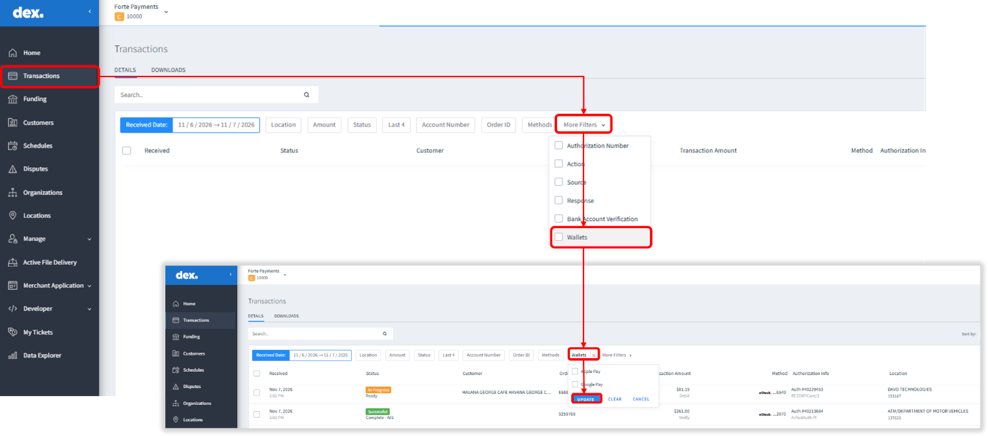
Digital wallet transactions are included in standard merchant reporting and can be identified in the “Transactions” datagrid in Dex. Apple Pay and Google Pay transactions can be filtered using the “Wallets” filter, allowing users to quickly locate transactions processed through either wallet.
The Wallet information is available as part of the transaction details, making it possible to distinguish wallet transactions from other card transactions when reviewing merchant activity. To locate wallet transactions in Dex:
- Access the “Transactions” datagrid in Dex.
- Click on the “More Filters” option.
- Select “Wallets.”
- Select “Apple Pay” or “Google Pay”, as applicable.
- Apply the filter to display transactions associated with the selected wallet.
Merchants who need assistance with digital wallet integration can contact the CSG Forte Integration team at 866-290-5400, Option 5.
Was this article helpful?
That’s Great!
Thank you for your feedback
Sorry! We couldn't be helpful
Thank you for your feedback
Feedback sent
We appreciate your effort and will try to fix the article