Questions
1. What is NSF Recovery Service?
2. How are NSF Recovery attempts processed?
3. How does the NSF fee work?
4. What are the maximum State NSF fees?
5. Can a merchant or partner request a different NSF fee amount, adjust timeframes or number of attempts?
6. Is customer authorization required to enable NSF fee charges?
7. How can merchants reconcile NSF Recovery activity?
8. How can a merchant discontinue NSF Recovery Services?
1. What is NSF Recovery Service? |
|
|
NSF Recovery Service automates the collection of eligible ACH or eCheck payments returned for nonsufficient or uncollected funds. The service can re-present the original payment, helping merchants recover revenue and reduce service interruptions caused by returned payments. Merchants receive the full value of successfully recovered original payments and may also receive a portion of successfully collected NSF fees. The service applies when an original ACH transaction is returned with R01 (Insufficient Funds) or R09 (Uncollected Funds). Note: To request NSF Recovery or adjust the current recollect timeframe, submit the NSF Recovery Add Services form.
2. How are NSF recovery attempts processed? |
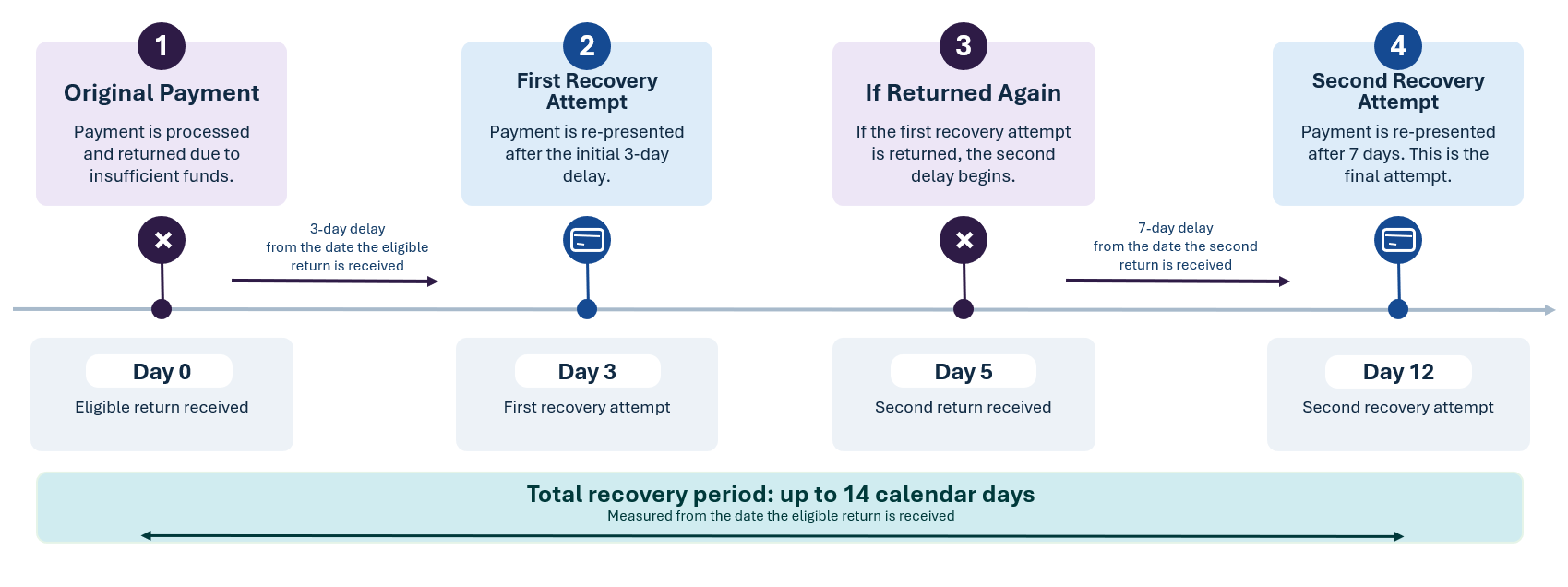
When a payment is returned and is eligible for NSF Recovery Services, it may be re-presented up to two additional times after the original transaction. This means the payment may be processed a maximum of three times in total: the original payment and up to two recovery attempts.
• First recovery attempt: Processed after a three-day delay from the date the eligible return is received.
• Second recovery attempt: If the first recovery attempt is also returned, another attempt may be processed after a seven-day delay from the date the second return is received.
• Overall recovery period: The recovery process will not exceed 14 calendar days.
Once a recovery attempt has been initiated, it cannot be canceled, voided, or reversed. If the customer needs to be reimbursed after the recovery attempt has been processed, the merchant must initiate a separate credit transaction to return the funds to the customer.
Note: Depending on the merchant's payment schedule, CSG Forte can configure the 1st and 2nd attempts to align with merchant's need. Merchants may also request to have the number of recollect attempts adjusted to 0, meaning that no additional recovery attempts will be made after the original transaction. The applicable NSF fee may still be charged to the customer. To request these changes, merchants should complete the NSF Recovery Add Services form.
3. How does the NSF fee work? |
|
|
When an original ACH transaction is returned with (R01 or R09), one attempt is made to collect an NSF fee from the customer. This fee is separate from the attempts to recover the original transaction amount and is charged regardless of whether the original payment is ultimately recovered.
The standard NSF fee is $20, subject to the maximum amount permitted by the laws applicable to the customer’s location and it is generally charged on the first day of the month following the original returned transaction. Merchants should ensure that customers are appropriately notified of the NSF fee when accepting ACH payments and that the amount complies with applicable state requirements. For successfully collected NSF fees, the standard merchant rebate is $3, credited to the merchant’s monthly invoice one month after collection. A standard $2 partner rebate may also be credited to the partner’s commission report during the same general period.
Note: There is no implementation cost to the merchant for the recovery service. However, depending on the merchant's agreement, an ACH Debit Reject (ACHDR) fee may apply when a transaction is returned.
4. What are the maximum State NSF fees? |
|
|
For ACH payments that are returned for lack of funds, the below amounts reference the maximum a merchant can charge for NSF fees by State. NSF fee costs are paid by the customer. Customers agree to pay these NSF fees when ACH payments are accepted by merchants who have appropriately provided notice of such fees (at the point-of-sale, in the language of any agreement, or electronically).
Note: The state law pertains to the customer location, not the merchant location.
STATE | NSF FEE STATE MAXIMUM |
Alabama | US$ 30 |
Alaska | US$ 30 |
Arizona | US$ 25 |
Arkansas | US$ 30 |
California | US$ 25 |
Colorado | US$ 20 |
Connecticut | US$ 20 |
Delaware | US$ 40 |
District of Columbia | US$ 25 |
Florida | US$ 25 if amount is < or = US$ 50 |
Georgia | US$30 if amount is < or = US$ 600 |
Hawai'i | US$ 30 |
Idaho | US$ 20 or amount of ACH, whichever is less |
Illinois | US$ 25 |
Indiana | US$ 25 |
Iowa | US$ 30 |
Kansas | US$ 30 |
Kentucky | US$ 25 |
Louisiana | US$ 25 or 5% of ACH amount, whichever is greater |
Maine | US$ 25 |
Maryland | US$ 35 |
Massachusetts | US$ 25 |
Michigan | US$ 25 |
Minnesota | US$ 30 |
Mississippi | US$ 40 |
Missouri | US$ 25 |
Montana | US$ 30 |
Nebraska | US$ 25 |
Nevada | US$ 25 |
New Hampshire | US$ 25 |
New Jersey | US$ 25 |
New Mexico | US$ 30 |
New York | US$ 20 |
North Carolina | US$ 25 |
North Dakota | US$ 40 |
Ohio | US$ 30 or 10% of check amount, whichever is greater |
Oklahoma | US$ 25 |
Oregon | US$ 25 |
Pennsylvania | US$ 25 |
Puerto Rico | US$ 10 |
Rhode Island | US$ 25 |
South Carolina | US$ 30 |
South Dakota | US$ 40 |
Tennessee | US$ 30 |
Texas | US$ 30 |
Utah | US$ 20 |
Vermont | US$ 25 |
Virginia | US$ 50 |
Washington | Lesser of US$ 40 or face amount of ACH |
West Virginia | US$ 25 |
Wisconsin | US$ 25 |
Wyoming | US$ 30 |
*This information should be independently verified by any entity which intends to charge an NSF fee, in order to ensure alignment with the laws and statutes governing each respective state.
5. Can a merchant or partner request a different NSF fee amount, adjust timeframes or number of attempts? |
|
|
Yes, a merchant or partner may request an increase or decrease to the NSF fee charged to customers.
➤ Any requested increase must remain within the maximum amount permitted by the laws applicable to the customer’s location. To request a lower NSF fee amount:
• Merchants: Should contact CSG Forte Customer Support by submitting a ticket, calling 866.290.5400 (option 1), or emailing customerservice@forte.net.
• Partners: Should email the resellers@forte.net including the details of the NSF change.
➤ To request adjustments to the recovery timeframe or number of attempts, merchants must submit the NSF Recovery Add Services form. Note: Merchants can submit to have their Recollect Attempts adjusted to 0, so that only the original transaction attempt will be shown. However, an NSF Fee will still be charged to the customer.
6. Is customer authorization required to enable NSF fee charges? |
|
|
Yes, before NSF fees and electronic re-debits are enabled, merchants must clearly notify customers that an unpaid debit may be electronically re-presented and that a processing fee may be charged. The authorization must identify the merchant, authorize the original debit and subsequent re-debit, and disclose the applicable fee or maximum legal amount, including applicable taxes where relevant. The following authorization language needs to be added to the website or invoice before enabling NSF fee charges:
As a duly authorized signer on the account supplied above, I authorize (Merchant Name) to electronically debit my account for the amount specified above. In the event that this debit is returned unpaid, I authorize this item to be electronically re-debited in addition to a processing fee of $20.00 (or maximum legal limit) plus applicable taxes.
Customer acceptance may be obtained through an agreement, electronic authorization, or appropriate notice at the point of sale. Merchants remain responsible for independently verifying the laws and statutory requirements that apply to customers in each state.
7. How can merchants reconcile NSF Recovery activity? |
|
|
Merchants can download transaction information from the "Transactions" section in Dex. The report can include the attempt number, settlement-code description, settlement date, settlement response code, and authorization number. The same authorization number appears across the related attempts, allowing merchants to group and reconcile the original transaction and its recovery attempts. Refer to the NSF Recovery Report in Dex resource.
8. How can a merchant discontinue NSF Recovery Services? |
|
|
Merchants that no longer wish to use NSF Recovery Services can request to have the service discontinued by completing the NSF Recovery Opt-Out form.
If a merchant decides to use NSF Recovery Services again in the future, the service can be requested by completing the NSF Recovery Add Services form.
Additional Resources:
• Recover revenue automatically from NSF checks and ACH
Was this article helpful?
That’s Great!
Thank you for your feedback
Sorry! We couldn't be helpful
Thank you for your feedback
Feedback sent
We appreciate your effort and will try to fix the article